MIDI-C10A MIDI CC Controller Manual0. How to Connect1. Panel Overview2. Compatible DAW SoftwareStudio One Setup GuideAbleton Live Setup GuideLogic Pro Setup GuideCubase Setup GuideFL Studio Setup GuideReaper Setup GuideCakeWalk Sonar Setup Guide3. How to Configure the Device's MIDI CC Output [Software Configurable, Saved Internally in Hardware]Custom MIDI Messages - Video Tutorial3.1 Start Adjusting the Device's MIDI CC Messages3.2 Using the MidiView Software Tool to View Real-time MIDI OutputMIDI VIEW Software Download4. Additional Notes
MIDI-C10A MIDI CC Controller Manual
0. How to Connect
- Connect to a computer using a USB cable. Supports USB Type-A and USB Type-C ports.
- The device supports macOS, Windows, Linux, and other operating systems.
- No driver installation is required; the device is immediately recognized by music software once connected.
1. Panel Overview
- Ten 12.5mm knobs
- Maximum rotation angle: 300° (not exceeding)
- One central red indicator light
- Yellow backlight between knobs
- Software-configurable MIDI messages
- MIDI 1.0, adjustment range 0~127, resolution 1 step
2. Compatible DAW Software
This device is suitable for controlling the Mixer (Mixconsole) section in most DAW software, and can also be used for real-time MIDI CC message input, such as drawing expression for strings in Cubase. It is commonly used to adjust parameters like track volume, left/right panning, knobs, etc. It can also be used with some music plugins that support MIDI control. The links below briefly explain how to assign functions to the MIDI device in various DAWs.
Studio One Setup Guide
Ableton Live Setup Guide
Logic Pro Setup Guide
Cubase Setup Guide
FL Studio Setup Guide
Reaper Setup Guide
CakeWalk Sonar Setup Guide
Note: In
Pro ToolsandSamplitude, the device can only be used for CC drawing and cannot be used for volume or other parameter function mapping.
3. How to Configure the Device's MIDI CC Output [Software Configurable, Saved Internally in Hardware]
When used to control specific MIDI CC messages, such as inputting CC data in Cubase or drawing string expression, you need to assign specific knobs to output specific MIDI CC messages.
Custom MIDI Messages - Video Tutorial
3.1 Start Adjusting the Device's MIDI CC Messages
The MIDIC10A MIDI controller supports modifying the device's MIDI CC output via software. The device has internal memory; once modified through the software, the settings are automatically saved to the device.
First, download the software used to configure the device's MIDI CC messages.
MIDIC10A MIDI CC Configuration Software Download (Windows)
MIDIC10A MIDI CC Configuration Software Download (Mac OS)
The software is available in macOS and Windows versions. Please select the correct version for your operating system.
Enter the Hardware ID, Message Type, Message Channel, and Controller Number, then click the "Set" button and wait a moment for the configuration to complete.
Note: Make sure no other music software is running during configuration, and ensure the device is not occupied by other software, otherwise the configuration will likely fail.
[This does not apply on macOS. When adjusting hardware MIDI messages on Windows, make sure the MIDI device is not opened by other software.]
3.2 Using the MidiView Software Tool to View Real-time MIDI Output
We recommend using this tool, or similar tools, to view the MIDI CC messages output by the device. This helps when adjusting and changing the MIDI CC output of the knobs. Of course, many DAWs can also display the device's MIDI output without needing third-party tools.
Since adjustments alone cannot visually show real-time MIDI changes, this tool allows you to see whether the device's MIDI messages are set correctly.
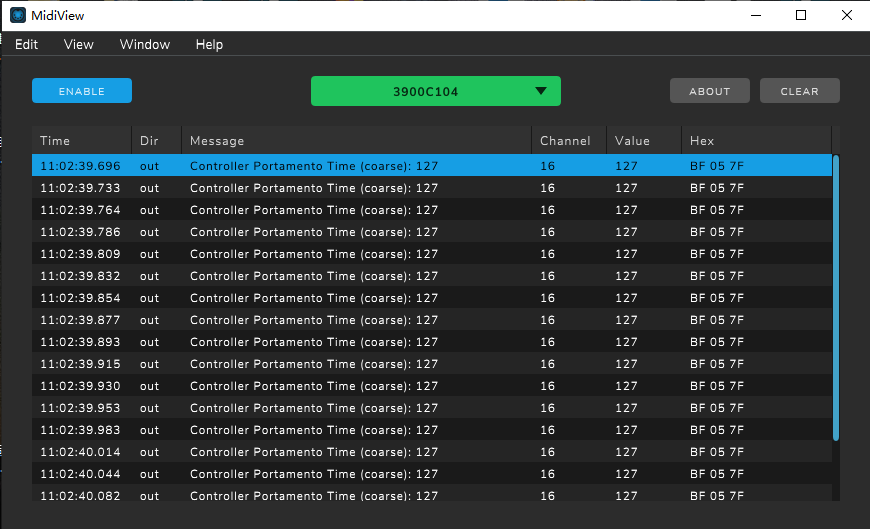
This software supports macOS and Windows.
On Windows, note that the MIDI device must not be occupied by other software when using this tool.
MIDI VIEW Software Download
4. Additional Notes
- It is recommended not to use excessively long cables to avoid insufficient power affecting accuracy.
- On Windows, a MIDI device can only be opened by one software at a time. This means if music software is running and occupying the device, you cannot open the configuration software to adjust MIDI messages.
- On macOS, MIDI devices are not subject to the
above limitation; you can modify MIDI messages at any time even while music software is running.